If you work in Third-Party Risk Management (TPRM), you know the feeling. A business owner comes to you and says, "We need to hire this vendor by Friday." You look at your queue, and there are 50 other vendors waiting for review.
The biggest mistake TPRM programs make is treating every vendor equally. They send the same 200-question security spreadsheet to the company delivering the office snacks as they do to the company processing the payroll.
This is a recipe for burnout. It slows down the business, dilutes your focus, and trains your organization to hate the security process.
The solution is Triage.
Before you ask a vendor if they are secure, you need to ask your internal team what the vendor will actually do. This allows you to calculate Inherent Risk — the level of risk a vendor poses based on the nature of their service, before any security controls are applied.
Here is the exact framework I use to triage vendors effectively.
The 3 Pillars of Inherent Risk#
When a new vendor request comes in, don't think about security controls (encryption, firewalls, etc.) just yet. First, focus on Data, Access, and Availability.
You might be wondering: “Why aren’t we asking about firewalls or background checks?”
The answer lies in the definition of Inherent Risk. Inherent Risk represents the "worst-case scenario" assuming no protections exist. At this stage, we don't care how secure the vendor claims to be. We only care about the impact on our business if they disappear or turn malicious tomorrow.
Once we know the Inherent Risk, only then do we look at their Residual Risk (Firewalls, Encryption, SOC 2 reports) to see if they have reduced that risk enough to be safe.
To determine Inherent Risk, we break the relationship down into three simple pillars.
1. Data Classification (The "Payload")#
If a vendor is hacked, what gets stolen?
- Public Data: Marketing brochures, website copy. (Low Risk)
- Internal Data: Internal memos, policies, organizational charts. (Low/Medium Risk)
- Confidential (PII): Names, email addresses, phone numbers. (High Risk)
- Restricted/Critical: SSNs, bank account numbers, health data, source code. (Critical Risk)
More data equals more damage. A vendor with 5 employee emails is a nuisance if breached. A vendor with 50,000 customer emails is a PR nightmare.
2. Access (The "Pipe")#
How does the vendor connect to our environment?
- Air-Gapped: You send them a file manually. If they get hacked, they can't jump into your network.
- SSO Integration: They use Okta or Azure AD. This is good for security, but it means they capture identity data.
- API (Read/Write): They are plugged directly into your system. If they are compromised, the attacker can use that "pipe" to infect you.
3. Availability (The "Stoppage")#
If this vendor disappears, does business stop?
- Negligible: It is an inconvenience. We can use a spreadsheet or a competitor.
- Critical Stoppage: Revenue, payroll, or core operations halt immediately.
The Tool: Vendor Intake Questionnaire#
To capture these three pillars consistently, use a short internal intake questionnaire.
This form is for the Internal Business Owner (the employee hiring the vendor), NOT the vendor.
Section 1: The "What" (Data)
-
What is the highest classification of data this vendor will access?
- Public / Internal Use Only
- Confidential (PII — Names, Emails)
- Restricted (Financials, Health Data, Passwords)
-
What is the approximate volume of records?
- Low (< 500)
- High (> 10,000)
Section 2: The "How" (Connectivity)
- Will the vendor integrate with our systems?
- No Integration (Website access only)
- SSO Only (Login via Okta/Azure)
- API Access (Read/Write capabilities)
Section 3: The "What If" (Criticality)
- If this vendor's service goes offline for 24 hours, what is the impact?
- Negligible (Inconvenience)
- Critical Stoppage (Revenue/Operations halt)
How to Score: The Triage Matrix#
Once you have the answers, assign a Tier. This Tier dictates your workload.
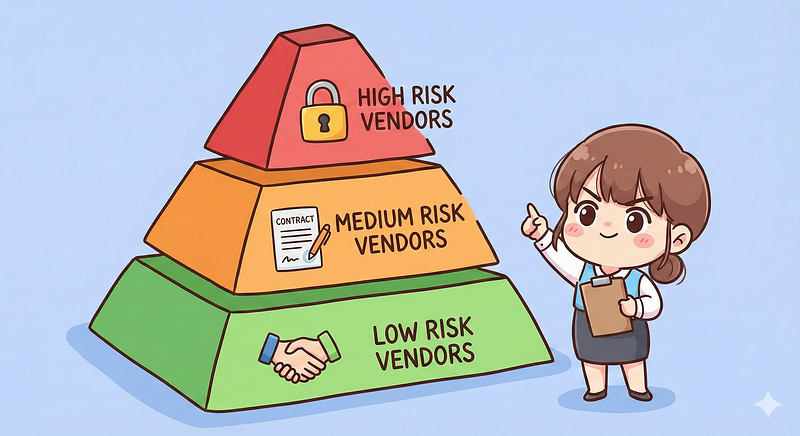
Tier 1: Critical Risk#
Triggers: "Restricted Data" OR "Critical Stoppage."
The Action: Full Assessment.
- Review SOC 2 Type II (all sections).
- Review Penetration Test summaries.
- Review Business Continuity (BCP) and Disaster Recovery (DR) plans.
- Perform a Financial Health Check.
Tier 2: High/Medium Risk#
Triggers: "Confidential Data (PII)" OR "API Access."
The Action: Standard Assessment.
- Review SOC 2 Type II or ISO 27001 certification.
- Confirm "Right to Audit" and "Data Breach Notification" clauses in the contract.
- Check for 4th Party dependencies (e.g., AWS/Azure).
Tier 3: Low Risk#
Triggers: "Public Data" AND "No Integration."
The Action: Minimal Review.
- Perform a basic reputation check (Google News search).
- Ensure a standard NDA is signed.
Conclusion: Stop Being the "Department of No"#
The goal of TPRM is not to eliminate risk — that's impossible. The goal is to understand risk well enough to make deliberate, informed decisions about where it can be accepted.
A strong intake questionnaire and triage process transform TPRM from a bottleneck into an enabler. Low-risk vendors move quickly, the business keeps its momentum, and security teams can focus their expertise on the vendors that truly pose a threat.
Done right, TPRM becomes a trusted advisor that protects the business without slowing it down.