A digital certificate is an electronic document used to prove the ownership of a public key.
This digital certificate is a special file containing:
- Website's Name (e.g., yourbank.com)
- Company Name (e.g., "Your Bank Ltd.")
- Public Key (used to encrypt data)
- Expiry Date (certificates expire, usually after a year or two)
- Issuer Information (Who issued this certificate? Example: "DigiCert", "Let's Encrypt")
- A Unique Digital Signature (created by the Certificate Authority)
As you navigate through the internet, your browser(Google Chrome, Brave)is more than just a tool for opening websites. It also protects you from fake or malicious websites by verifying this digital certificate.
For example, when you visit your bank's website, https://yourbank.com, and enter your login credentials, you trust that the site is secure because your browser downloads the digital certificate and verifies it.
But what if there is no digital certificate and the browser doesn't perform the certificate verification?
Without verification, a hacker (let's call him Mr. Bad Guy) could create a website that looks identical to your bank's site, such as https://yourbank-secure.com. Without the proper verification, you might unknowingly log in and enter your password in the fake site. Once you do, Mr. Bad Guy can steal your login credentials and gain access to your bank account. In this case, you would be hacked.
What happens if there is digital certificate and the browser performs certificate verification?
The Digital certificate contains the public key and proves that the website is legitimate because the certificate is signed by a trusted Certificate Authority (CA), confirming the website's identity.
Next, let's see how a secure communication is established using the digital certificate?
After the browser downloads the digital certificate, it performs several more steps to establish encryption.
- Step 1: Digital Certificate is Shared (contains the public key).
- Step 2: Browser Generates a Session Key (random).
- Step 3: Session Key is Encrypted Using Asymmetric Encryption (using public key).
- Step 4: Bank Decrypts the Session Key Using Its Private Key.
- Step 5: Secure Communication Happens Using Symmetric Encryption (with session key).
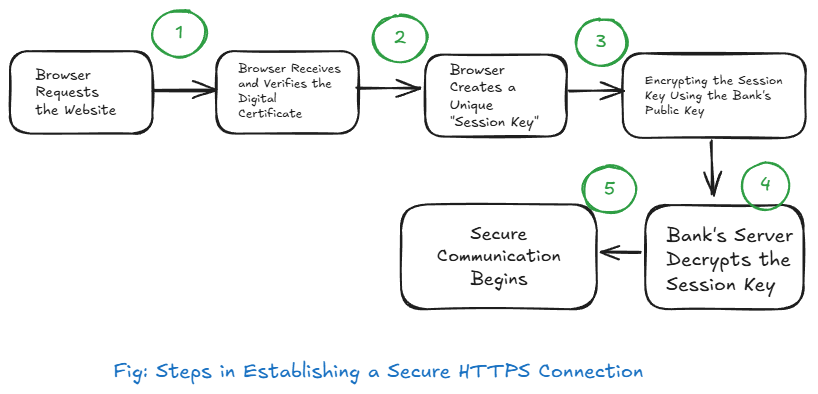
While I was researching in depth about the digital certificate and the secure communicationm process, many questions arose in my head making me overwhlmed, I think it happens with the most beginners. So let's answer the questions next.
Q. Is digital certificate alone enough for encryption?
A digital certificate alone is NOT enough for encryption.
✔ It only provides the public key for secure key exchange.
✔ The real encryption happens when:
- The browser creates a unique session key.
- The browser encrypts the session key using the public key.
- The bank decrypts the session key using its private key.
- After this, all communication is encrypted using the session key.
Q. When the Session Key is Shared, is it Done with Asymmetric Encryption?
✔ Yes, the session key is shared using asymmetric encryption.
✔ The browser encrypts the session key using the bank's public key (from the digital certificate).
✔ The bank decrypts it using its private key (which only the bank has).
Encryption type: 🔒Asymmetric encryption (Public-Key Cryptography) is used only for sharing the session key.
Q. After the Session Key is Shared, How is the Actual Communication Done?
✔After the session key is securely shared, all further communication happens using symmetric encryption. ✔ This is because symmetric encryption is much faster and efficient than asymmetric encryption.
Encryption Type: 🔒 Symmetric encryption (Shared-Key Cryptography) is used for the actual data exchange.
Takeaway:
- Asymmetric encryption (public/private key) is slow and used only for key exchange.
- Symmetric encryption (same session key) is fast and used for actual data transfer.
Q. Does the Bank Use the Same Digital Certificate for Every User and Every Connection?
Yes, the bank uses the same digital certificate for every user.
✔ The public key in the certificate is the same for every connection.
✔ Any user (including a hacker with a bank account) can see the public key.
However, this does NOT compromise security because:
✔ The private key is never shared — only the bank has it.
✔ The real security starts after the session key is created.
✔ Each session key is randomly generated per connection, so every connection has a unique encryption key.
After learning all this, one question comes to mind: What is a digital certificate actually doing? If it's not solely responsible for making the communication secure, let's answer that question.
What is the digital certificate actually doing here?#
A digital certificate is NOT directly encrypting the communication. It doesn't directly make the communication secure, but it is necessary for security.
✔ It prevents impersonation attacks (fake websites).
✔ It allows the browser and server to safely exchange the encryption key (session key).
✔ The actual secure communication happens afterward using the encrypted session key.